Why Hackers Prefer Linux · Volume 3
The Shell, the Text Stream and the Package Archive
The previous volume dealt with capabilities — things that can be done on one platform and not on another. This one deals with something less dramatic and probably more consequential in daily use: the interface through which the work is done, and where the software comes from. Neither is unique to Linux. Both are more thoroughly committed to on Linux than anywhere else, and that difference of degree changes how investigations are conducted.
3.1 Text as the universal interface
The design decision underneath the Unix shell is that programs read text and write text, and that the operating system provides a cheap way to connect one program’s output to the next program’s input. It is an old idea and an unfashionable one, and it produces an effect that is difficult to appreciate until it is lost: any tool can be composed with any other tool, including tools whose authors never heard of each other.
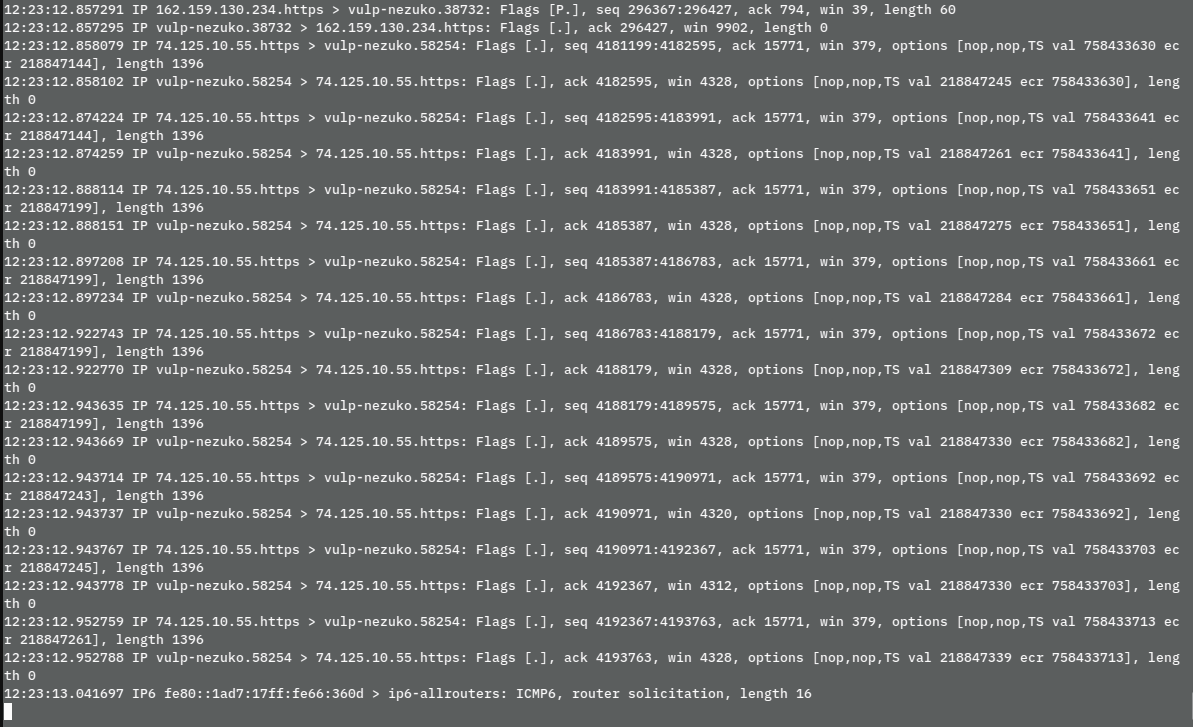
The packet capture above illustrates the point precisely. tcpdump is a specialised tool sitting on a kernel capture interface, but its output is lines of text with a predictable structure, so the question “which hosts appear most often in this capture” needs no feature in tcpdump and no new program:
tcpdump -n -r capture.pcap | awk '{print $5}' | cut -d. -f1-4 | sort | uniq -c | sort -rn | headNothing in that pipeline was designed for the others. awk predates the capture format; sort and uniq predate almost everything. The composition works because all four agree on lines of text, and the practitioner gets an answer in the time it takes to type the question.
Three properties follow that matter more for security and systems work than for most other fields:
Investigations become reproducible. A pipeline is a written record of what was done. It can be pasted into a report, re-run against a second capture, or corrected and re-run when the first attempt was wrong. A sequence of clicks in a graphical tool is none of those things.
Manual work converts to automatic work continuously. The command typed once becomes a shell function, then a script, then a cron job or a CI step, without ever being rewritten in a different language. The distance between “did it by hand” and “it runs nightly” is unusually short.
Remote and local are the same. The interface works identically over SSH on a machine with no display, which is where most of the systems under discussion actually are.
The honest counterweight is that PowerShell is a serious rebuttal to part of this. It passes structured objects rather than text, which eliminates an entire class of parsing fragility that Unix pipelines suffer from — the moment a filename contains a space, the elegance above becomes a minefield. PowerShell is also genuinely cross-platform now. The Unix advantage is not that its model is theoretically superior; it is that its model is what every tool in the ecosystem already assumes, including tools written thirty years apart.
3.2 The shell as a first-class interface, not a fallback
The sharper distinction is not the shell’s existence but its status. On Linux, effectively every capability of the system is reachable from the command line, because the command line is how the system is administered and how it is administered remotely. Graphical tools are, very often, front ends to command-line tools.
On the other platforms the relationship is frequently inverted: the graphical tool is the product and the command-line interface is a subset provided for automation. The macOS wireless story from the previous volume is a small illustration — Wireless Diagnostics is the supported route, and the scriptable airport utility is the thing that was deprecated.
This has a practical consequence for skill accumulation. Where the command line is primary, everything learned is composable with everything else learned, and knowledge compounds. Where it is secondary, a proportion of what is learned is tied to a specific application’s interface and does not transfer.
3.3 Where the software comes from
The second half of this volume is unglamorous and probably accounts for more of the day-to-day preference than any deep property of the kernel.
On Linux, installing a tool is one command against a maintained archive:
sudo apt install nmap tcpdump wireshark ghidraThe archive supplies dependency resolution, cryptographic signing, a single update path for everything installed, and a maintainer who has already dealt with the build. Distributions aimed at security work extend this deliberately: Kali is Debian-based and ships, by its own documentation, several hundred tools, configurations and scripts, with network services disabled by default and a kernel patched for wireless injection.
The comparison is fairer than it is usually made. Homebrew on macOS is excellent and covers most open tooling. winget and Chocolatey have made real progress on Windows. Language-level managers — pip, cargo, npm, go install — are cross-platform and carry a great deal of modern tooling regardless of operating system.
Three differences survive that comparison:
- Breadth of the security-tool long tail. Mainstream tools are everywhere; the obscure ones are usually packaged for Debian and Arch and nowhere else, and building them from source is markedly less painful on the platform their author used.
- The archive is the operating system’s archive. On Linux the same mechanism updates the kernel, the libraries and the tools, with one signing trust root. Homebrew and
wingetsit beside the operating system’s own update mechanism rather than inside it. - Whole-environment reproducibility. A container image, a Debian package list, or a declarative configuration reconstructs a working environment on another machine exactly. This is the property that makes it reasonable to treat a working machine as disposable.
Point 3 deserves the closing note, because it changes behaviour rather than merely convenience. When an environment can be rebuilt from a text file in minutes, a practitioner will cheerfully install questionable tooling in a throwaway virtual machine, wreck it, and rebuild. When rebuilding means an afternoon of installers and licence keys, the same person is markedly more careful — and being markedly more careful is, in this line of work, a real handicap.
Comments (0)